Mobile Platforms

The platform decision that decides your next three years of budget

Swift, Kotlin, React Native and Flutter are each the right answer to a different question, and picking wrong shows up eighteen months later as a rewrite nobody budgeted for. We make the call from what your app has to do on the device, then build it properly on whichever side of the line it falls.

A senior engineer replies within 24 hours — not a sales rep.

BINARYBRILL - BRILLIANCE IN EVERY BIT | BINARYBRILL - BRILLIANCE IN EVERY BIT | BINARYBRILL - BRILLIANCE IN EVERY BIT | BINARYBRILL - BRILLIANCE IN EVERY BIT | BINARYBRILL - BRILLIANCE IN EVERY BIT | BINARYBRILL - BRILLIANCE IN EVERY BIT | BINARYBRILL - BRILLIANCE IN EVERY BIT

Where platform decisions quietly go wrong

The stack was chosen before the requirements existed

Someone picked the framework in week one, usually because it was what the first developer knew. The requirement for Bluetooth pairing, background audio or a custom camera arrived in month nine. Now half the roadmap is native bridge work, and the team is carrying the overhead of cross-platform without collecting the saving.

Android is not one device, it is a long tail

Testing happens on two Pixels and a recent Samsung. Your users are on four-year-old mid-range hardware with aggressive battery management that kills your background sync, manufacturer skins that break your notification styling, and screen sizes your layout was never checked against. The one-star reviews come from devices nobody on the project owns.

Two native codebases, two roadmaps, one budget

Going fully native was the correct engineering call, but nobody staffed for it. iOS ships the feature first, Android follows three weeks later with a slightly different behaviour, and support now has to ask which phone the customer is holding before answering. Parity drift is a delivery problem long before it becomes a code problem.

The shared-code percentage keeps falling

It started at ninety percent shared. Then came platform-specific payment sheets, a native map component, a permissions flow Apple wanted handled differently, and a performance fix that had to be written twice. Each was reasonable in isolation. Together they mean you now maintain three codebases instead of two.

BINARYBRILL - BRILLIANCE IN EVERY BIT | BINARYBRILL - BRILLIANCE IN EVERY BIT | BINARYBRILL - BRILLIANCE IN EVERY BIT | BINARYBRILL - BRILLIANCE IN EVERY BIT | BINARYBRILL - BRILLIANCE IN EVERY BIT | BINARYBRILL - BRILLIANCE IN EVERY BIT | BINARYBRILL - BRILLIANCE IN EVERY BIT

How we make and then execute the platform call

This is an economic decision dressed as a technical one. The question is not which framework is better — it is which one costs you less across the whole life of the product, given what the app does and who you can hire.

We list the device capabilities first, then choose

Background location, Bluetooth peripherals, camera control, offline media, biometrics, widgets, wearables. We write down every OS-level capability the product needs now and plausibly needs next year, and check each against what the cross-platform runtimes support without a bridge. The recommendation falls out of that list rather than out of preference.

Cross-platform when the ceiling is genuinely far away

Content, commerce, booking and workflow apps rarely touch the hardware in ways React Native or Flutter cannot handle. Where that holds, one team ships both stores, features land on the same day, and your QA surface halves. We build these with a real native escape hatch in place from the start, so the first platform-specific requirement is not a crisis.

Native when the device is the product

Sustained background work, tight camera or sensor control, heavy rendering, or an interface that has to feel indigenous to the platform — these argue for Swift and Kotlin, and we say so even though it costs more. Sometimes the honest answer is native on one platform where your users actually are, and nothing on the other until it earns itself.

Shared design language, platform-specific manners

One design system, one set of tokens, one component inventory — but navigation, gestures, share sheets, date pickers and permission prompts follow each platform's conventions. An iOS user should not feel they are using an Android app in a costume, and the reverse is just as noticeable.

BINARYBRILL - BRILLIANCE IN EVERY BIT | BINARYBRILL - BRILLIANCE IN EVERY BIT | BINARYBRILL - BRILLIANCE IN EVERY BIT | BINARYBRILL - BRILLIANCE IN EVERY BIT | BINARYBRILL - BRILLIANCE IN EVERY BIT | BINARYBRILL - BRILLIANCE IN EVERY BIT | BINARYBRILL - BRILLIANCE IN EVERY BIT

What this covers

Pick the piece you need, or bring us the problem and we'll tell you which applies.

Mobile App Development

End-to-end app builds covering product shaping, design, backend, store release and the retention work afterwards. If you are looking for the full picture of how we run a mobile engagement, that has its own page.

  • Discovery through to published App Store and Play Store listings
  • Backend APIs, push infrastructure and analytics built alongside the app
  • Detailed breakdown on our dedicated mobile app development page
iOS App Development

Swift and SwiftUI apps built for the current Apple ecosystem rather than a lowest common denominator. Right when your audience skews iPhone, when the interface needs to feel native, or when you depend on frameworks that have no cross-platform equivalent.

  • SwiftUI and UIKit interfaces that follow Apple's Human Interface Guidelines
  • Home screen widgets, App Clips, Apple Watch companions and Live Activities
  • Sign in with Apple, Apple Pay, StoreKit subscriptions and Keychain storage
  • App Review preparation: privacy nutrition labels, tracking prompts, account deletion paths

Android App Development

Kotlin and Jetpack Compose apps engineered for the fragmentation that defines Android in practice. Most Android problems reaching production are not bugs in the code — they are assumptions about hardware, OEM behaviour or background execution that nobody tested.

  • Jetpack Compose interfaces with Material 3 theming and predictive back
  • WorkManager and foreground services that survive aggressive OEM battery management
  • Testing across older mid-range hardware, small screens and constrained memory
  • Play Console release tracks, staged rollouts, Play Billing and Android App Bundles

Cross-Platform Apps

One codebase in React Native or Flutter serving both stores, with native modules where the framework runs out. This is the cheaper route when your app is mostly screens, data and workflow — and we will tell you plainly when your requirements put it out of reach.

  • React Native with Expo, or Flutter, chosen against your team's hiring reality
  • Native module boundaries defined up front so platform-specific work is planned, not improvised
  • Over-the-air updates for JavaScript-layer fixes without waiting on store review
  • Shared business logic with per-platform navigation, gestures and system prompts

BINARYBRILL - BRILLIANCE IN EVERY BIT | BINARYBRILL - BRILLIANCE IN EVERY BIT | BINARYBRILL - BRILLIANCE IN EVERY BIT | BINARYBRILL - BRILLIANCE IN EVERY BIT | BINARYBRILL - BRILLIANCE IN EVERY BIT | BINARYBRILL - BRILLIANCE IN EVERY BIT | BINARYBRILL - BRILLIANCE IN EVERY BIT

The stack we build on

Chosen to fit the problem — not because it's what we used last time.

iOS

  • Swift
  • SwiftUI
  • UIKit
  • Combine
  • Core Data
  • WidgetKit
  • XCTest

Android

  • Kotlin
  • Jetpack Compose
  • Coroutines
  • Room
  • Hilt
  • Material 3
  • Espresso

Cross-platform

  • React Native
  • Flutter
  • Expo
  • Dart
  • TypeScript
  • Kotlin Multiplatform

Shared services & tooling

  • Firebase
  • REST & GraphQL APIs
  • APNs & FCM
  • Fastlane
  • GitHub Actions
  • Crashlytics

BINARYBRILL - BRILLIANCE IN EVERY BIT | BINARYBRILL - BRILLIANCE IN EVERY BIT | BINARYBRILL - BRILLIANCE IN EVERY BIT | BINARYBRILL - BRILLIANCE IN EVERY BIT | BINARYBRILL - BRILLIANCE IN EVERY BIT | BINARYBRILL - BRILLIANCE IN EVERY BIT | BINARYBRILL - BRILLIANCE IN EVERY BIT

How we'll work together

Every stage ends with something in your hands — not a status update.

  1. 01

    Capability audit and platform recommendation

    We inventory every OS-level feature the product depends on, the devices and OS versions your audience actually carries, and what your team can realistically maintain afterwards. Then we price the plausible routes against each other rather than arguing about them.

    You get: A capability matrix, a written platform recommendation with the trade-offs stated, and a cost comparison of the routes we rejected.

  2. 02

    Architecture and the shared-code boundary

    We draw the line between shared and platform-specific code before any of it is written, and decide where native modules will live. On fully native builds this is where we agree how iOS and Android stay in step without duplicating every decision twice.

    You get: An architecture document, a module boundary map, and an agreed device and OS support matrix.

  3. 03

    Build with both stores running in parallel

    Signed builds go to TestFlight and Play internal testing from the first sprint, on both platforms at once. Reviewing the same feature side by side on two handsets is how parity gaps get caught in the week they appear rather than at release.

    You get: Installable builds on both platforms every sprint, CI pipeline with signing configured, and code in your repository throughout.

  4. 04

    Device verification and store release

    Testing across the real support matrix — older mid-range Android hardware, small screens, low memory, restricted background execution — then submission with the privacy declarations and review material each store expects.

    You get: Device test results against the agreed matrix, published listings on both stores, and signing assets transferred into your own developer accounts.

BINARYBRILL - BRILLIANCE IN EVERY BIT | BINARYBRILL - BRILLIANCE IN EVERY BIT | BINARYBRILL - BRILLIANCE IN EVERY BIT | BINARYBRILL - BRILLIANCE IN EVERY BIT | BINARYBRILL - BRILLIANCE IN EVERY BIT | BINARYBRILL - BRILLIANCE IN EVERY BIT | BINARYBRILL - BRILLIANCE IN EVERY BIT

Where we've applied this

Mobility & transport

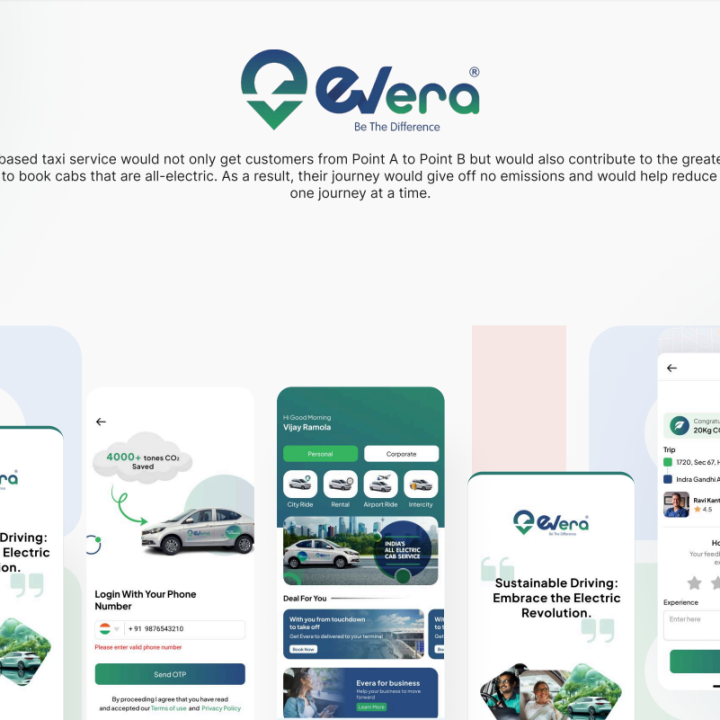
Rider and driver apps where background location has to keep reporting through battery optimisation and a locked screen, which is usually what forces the native decision.

Retail & e-commerce

Shopping apps that live or die on scroll performance and checkout speed on budget handsets, and where native payment sheets need to feel like the platform's own.

Health & fitness

Coaching and tracking apps that read from Apple Health or Google Fit, run video offline, and hold sensor permissions users are quick to revoke.

Field operations & logistics

Technician and driver apps for warehouses and basements: barcode scanning, rugged Android hardware, and long shifts where battery draw is a real constraint.

Finance

Banking and wallet apps where biometric authentication, secure key storage and certificate pinning are handled with the platform's own primitives rather than a wrapper.

Media & entertainment

Streaming and audio apps needing background playback, lock-screen controls and casting, all of which behave differently enough per platform to shape the build.

BINARYBRILL - BRILLIANCE IN EVERY BIT | BINARYBRILL - BRILLIANCE IN EVERY BIT | BINARYBRILL - BRILLIANCE IN EVERY BIT | BINARYBRILL - BRILLIANCE IN EVERY BIT | BINARYBRILL - BRILLIANCE IN EVERY BIT | BINARYBRILL - BRILLIANCE IN EVERY BIT | BINARYBRILL - BRILLIANCE IN EVERY BIT

Clients we've built for

Real products, in production, with real users on them.

BINARYBRILL - BRILLIANCE IN EVERY BIT | BINARYBRILL - BRILLIANCE IN EVERY BIT | BINARYBRILL - BRILLIANCE IN EVERY BIT | BINARYBRILL - BRILLIANCE IN EVERY BIT | BINARYBRILL - BRILLIANCE IN EVERY BIT | BINARYBRILL - BRILLIANCE IN EVERY BIT | BINARYBRILL - BRILLIANCE IN EVERY BIT

Questions buyers ask us

Is cross-platform actually cheaper?

For the initial build, usually yes — roughly one team instead of two, and a single QA pass over shared logic. Across the product's life the maths is less obvious. Every native module you end up writing costs twice, and you inherit a dependency on a framework whose upgrade cycle you do not control. Our rule of thumb: if the app is screens, data and workflow, cross-platform saves real money. If it leans on the hardware, the saving evaporates around the second year.

Screen count matters less than people expect. The expensive things are offline behaviour, real-time features like live tracking or chat, payment and subscription flows, and every integration with a system you do not control. Supporting older OS versions and low-end devices adds testing time rather than build time. After a shaping conversation we can give you a range, and a short paid discovery converts that into a fixed scope.

You can, and it is a legitimate strategy for validating a product quickly, but be honest about the cost. A migration is close to a rewrite of the client layer, so it only makes sense if the cross-platform version bought you real market learning first. The way to keep the option open is a clean separation between business logic and UI, plus an API that does not assume anything about the client. We build that separation by default.

Look at your own analytics if you have an existing app, and at your market if you do not — device profiles differ sharply between regions. As a default we target the current OS version and the two before it, which covers the overwhelming majority of active devices without dragging deprecated APIs through the codebase. We agree this in the capability audit because it moves the estimate more than most features.

Yes, in both directions. We take over live apps — starting with a paid review of the codebase, the crash data and the release setup before touching features — and we also embed alongside client engineers, often taking one platform while your team holds the other. Either way, the code stays in your repository and your engineers keep review rights.

You do, from the first commit: repository, designs, signing certificates and store listings. We publish under your own Apple and Google developer accounts rather than ours, because moving a live app out of an agency account later is genuinely painful and costs you your reviews and rankings. If those accounts do not exist yet, we help you set them up before submission.

BINARYBRILL - BRILLIANCE IN EVERY BIT | BINARYBRILL - BRILLIANCE IN EVERY BIT | BINARYBRILL - BRILLIANCE IN EVERY BIT | BINARYBRILL - BRILLIANCE IN EVERY BIT | BINARYBRILL - BRILLIANCE IN EVERY BIT | BINARYBRILL - BRILLIANCE IN EVERY BIT | BINARYBRILL - BRILLIANCE IN EVERY BIT

Not sure which platform your app should be on?

Tell us what the app needs to do on the device and who your users are. A senior mobile engineer replies within one business day with a platform recommendation and the reasoning behind it — including when the cheaper route is the right one.